
Workspaces and local media
Create a workspace
A workspace is linked to a local folder. OctSum indexes its video and audio files.
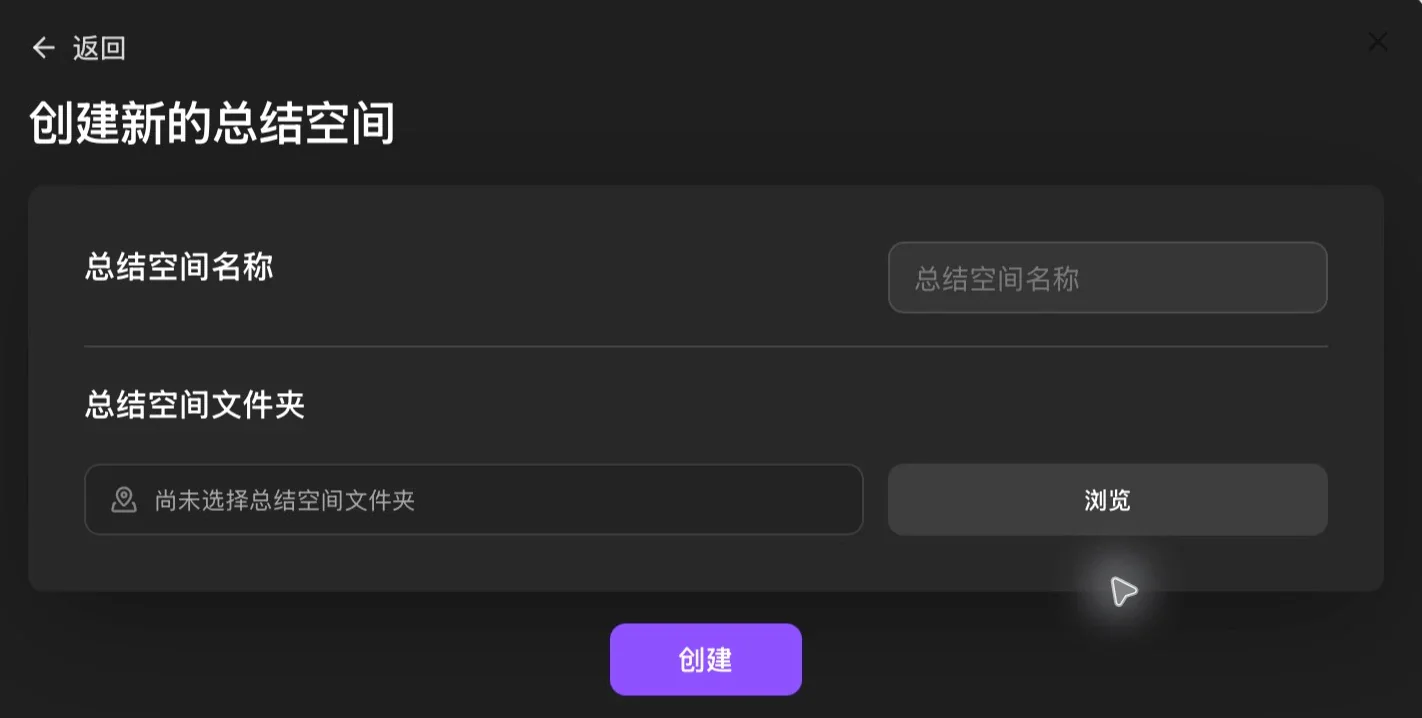
- Click 管理空间 (Manage workspaces) at the bottom left.
- Under 绑定现有视频文件夹 (Bind an existing media folder), click 创建 (Create).
- Enter a workspace name, use 浏览 (Browse) to choose a folder, then click Create.
Open and switch workspaces
In Manage workspaces, click 打开 (Open) under the existing workspace option and select a workspace folder used previously. Switch the active workspace with the selector at the bottom left.
Add local media
Place video or audio files in the workspace folder. Wait for indexing in the file tree, then click a file to open it. Subfolders are included. Downloads go to the workspace’s Default folder or your configured download folder.
Keep the workspace’s .sumvue data directory. Back up both media and this directory to retain transcripts, summaries and other work. Moving media can leave older records pointing to paths that no longer exist.