
Download videos
Download from a URL
- On 首页 (Home), paste a Bilibili or YouTube video URL into the video link field.
- Click 仅下载 (Download only) for media alone, or 一键总结 (One-click summary) for a transcript and summary as well.
- Follow progress in Task queue, then open the downloaded file from the file tree.

The demo is BV13eH46nEuC, approximately 7 minutes 31 seconds long. Its filename comes from the original video title.
Download folder and login Cookies
Open 设置 → 视频下载 (Settings → Video download). Click 选择 (Choose) beside the download folder. Use a folder within the current workspace for indexing and subsequent processing.
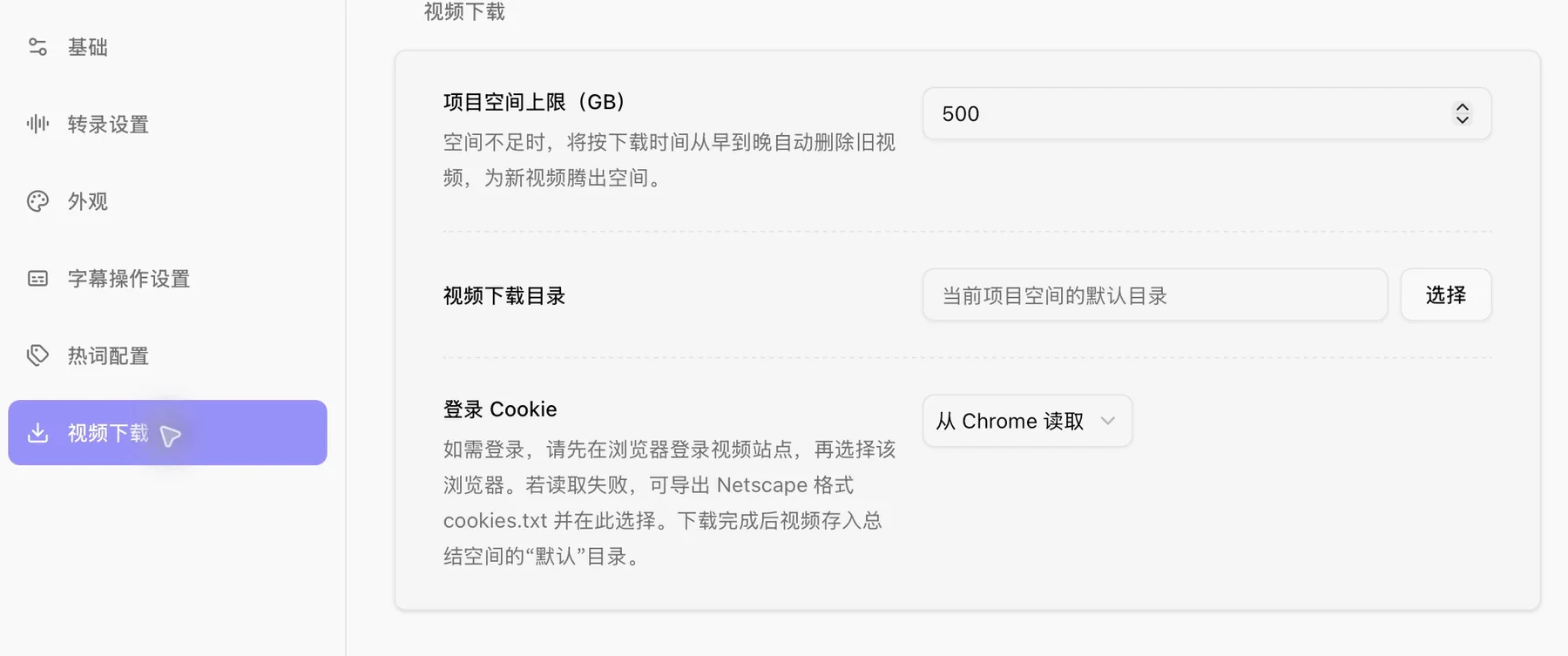
For videos requiring authentication, sign in to the site in your browser, then choose that browser under Login Cookie. If browser extraction fails, select a Netscape-format cookies.txt using the available options. An authenticated Bilibili session can also be used through the in-app Bilibili page.
The workspace storage limit controls downloaded media usage. At the limit, older downloads may be removed in download order. Back up files you need to retain before changing this setting.
If a download fails
Read the task error first. Check Cookies for authentication errors, connectivity for network errors, and website playback for unavailable or restricted videos. After correcting the cause, click Retry on the original task.