
Local subtitle translation
Prepare a transcript and model
Local translation translates an existing transcript into another language; it does not recognize audio. Complete transcription first and confirm that the app has valid activation.
Open Settings → 本地模型设置 (Local model settings). Under 翻译模型 (Translation models), download Index-Translate-2B and wait for 已安装 (Installed). The interface lists approximately 1.61GB. A transcription model cannot substitute for this translation model.

Start local translation
- Open media with a transcript and click 翻译 (Translate) in the top toolbar.
- Turn off 远程模型翻译 (Remote model translation).
- Confirm Index-Translate-2B under 本地翻译模型 (Local translation model).
- Choose the target language: Chinese for an English-to-Chinese translation, or English for Chinese-to-English. The screenshot shows English; adjust it for your source.
- Click 开始翻译 (Start translation) and follow progress in the task queue.
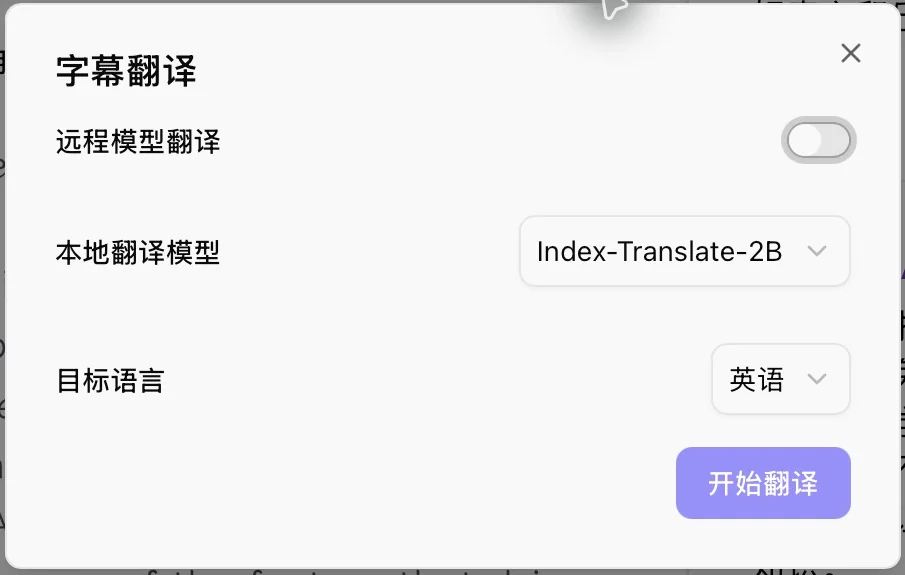
Model inference runs on your computer without a remote translation model or remote translation charges. Downloading and using the model still requires valid activation. Online activation checks are separate from local inference. Estimated savings in the task are estimates, not actual charges or refunds.
Review and export
When translation finishes, select its language under 字幕语言 (Subtitle language). Switch back to the source as needed and verify the text against playback. Translation preserves subtitle timing and order and does not change video duration. Use the subtitle export action described in Copy and export, checking the chosen language and format.
The CLI reads the app's saved translation mode. Select local mode in the app's translation dialog before running:
octsum translate "导入/lesson.mp4" --target-language en
octsum transcript show "导入/lesson.mp4" --target-language en
octsum transcript export "导入/lesson.mp4" --target-language en --format srt --output "lesson-en.srt"
Run inside the workspace or add --workspace. --target-language selects the destination language; it does not enable local mode. Submitted tasks retain their chosen mode even if you later change the switch.
Batch translation
Select files with existing transcripts and use the translation action under 批量操作 (Batch actions), choosing the target language and local model before submitting. The CLI accepts multiple files or --all to explicitly select the entire workspace:
octsum translate "导入/lesson-1.mp4" "导入/lesson-2.mp4" --target-language en
octsum translate --all --target-language en --no-wait
Troubleshooting
| Symptom | Check |
|---|---|
| Disabled action or missing subtitles | Transcribe the file and confirm its transcript exists |
| Local model unavailable | Download Index-Translate-2B and confirm it is installed |
| Activation expired | Restore valid activation and retry |
| Engine lacks translation support | Update to an app build containing the translation engine capability; downloading the model alone is insufficient |
| Online service still used | Check the remote switch at submission time; retrying an existing task retains its original mode |
| Failed or cancelled translation | Inspect the task error, fix the cause and rerun; do not treat an unfinished task as a complete translation |
Screenshots were captured from macOS 0.5.1. On other platforms, update the corresponding app and engine if a capability error appears.